
/dev: WASD’s Ranked Release
Hello everyone! We’re back for our third and final act to discuss WASD one last time as the WASD dev team. From here on out, WASD will be a live feature and will receive ongoing support and maintenance, just like SR!
First and foremost, thank you to the hundreds of thousands of WASD playtesters across the globe. Your feedback and time spent playing has been critical and, as a team, we’re very grateful.
As we shared in today’s Dev Update, WASD will be going live in Ranked in patch 26.9 with the release of Season 2! Read below for more details on what to expect, as well as stories from development too!
Ranked Readiness
Every patch since WASD’s initial release, we (and some of you) kept asking: “Is WASD ready for Ranked?”
We decided on these two goals to determine WASD’s Ranked readiness:
- WASD is not overpowered: WASD’s win-rate should not be greater than Point and Click’s win-rate.
- WASD is generally equitable: There should be a low win-rate difference between control schemes.
After extensive testing, analysis, and adjustments, we’ve gotten to a point where WASD has reached a similar performance level as Point and Click controls. There's still a small delta in the win-rates between the control schemes, with Point and Click having a minor advantage. We expect that difference will decrease over time as players gain more mastery with WASD, but we will continue to monitor this stat in the future.
Blind Experiential Analysis
In addition to the quantitative data, we also measured the experiential quality of both control schemes since launch last year. We did this through sentiment analysis surveys sent to players after they finished games.
These surveys were sent when players completed games where both control schemes were in use. Across every queue with WASD controls enabled, we found that there was almost no game experiential impact: Players were generally unable to detect what control set was being used by their opponent.
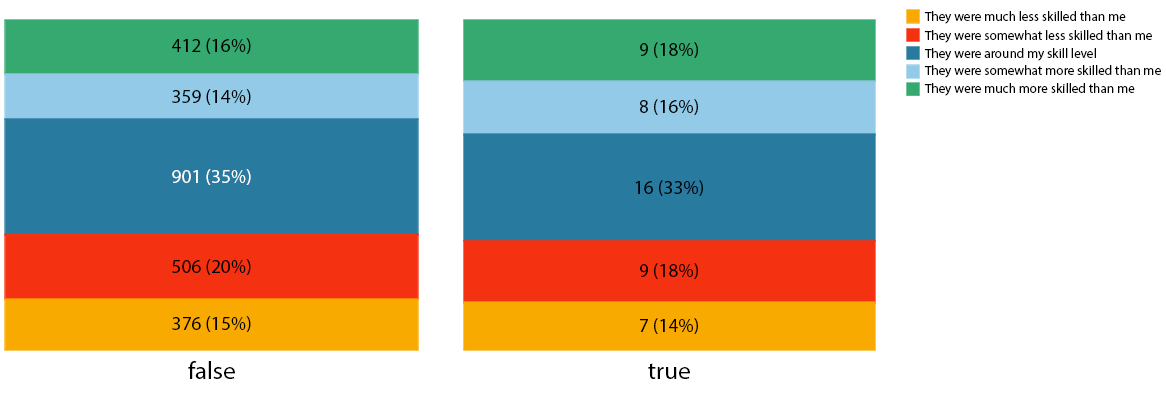 Question 1: “How would you describe the skill of your lane opponent?”
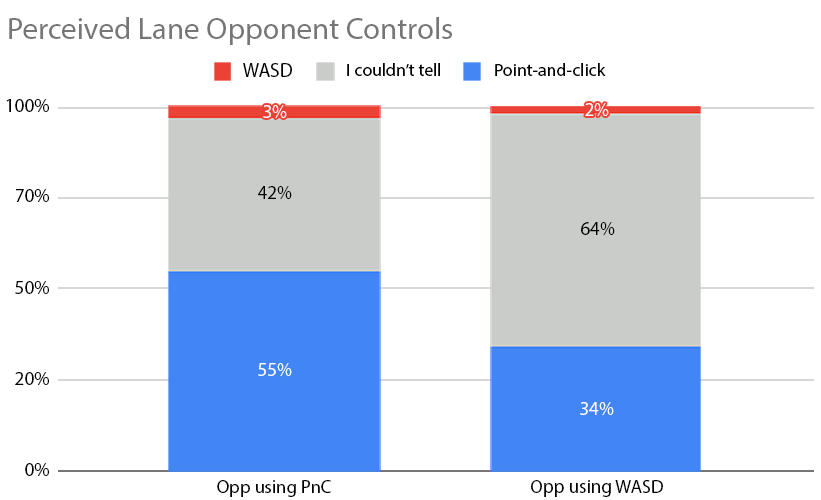
Question 2: "What control scheme do you think your lane opponent was using in the match you just played?"
Fine-Tuning for Ranked
Before bringing WASD to Ranked, we spent time adjusting its core mechanics to ensure that gameplay would be smooth and enjoyable. We read a ton of your feedback and did plenty of playtesting to identify things that we could further polish.
Let’s take a look at two examples of things we iterated on extensively.
Pathfinding
Before WASD, champions didn’t often directly interact with walls. When you right-click to choose a movement destination in Point and Click, champions plan their way around obstacles in advance. That’s very different from the immediate directional movement that WASD brings. With WASD, it’s more common to input movement commands that path directly into walls and other impassable areas.
To help folks find their way around map terrain smoothly it was key to calibrate WASD movement to handle walls of all shapes and sizes. The engineering team provided our design team with adjustment parameters to help perfect when a champion would slide around a curve, or come to a stop up against a wall to line up for a gank. We tested every pit and corner in Summoner’s Rift to make sure that we were always moving in the ways we expected.
In the clip below you can see the debug visualization of our WASD pathfinding algorithm helping Viego find his way through the jungle.
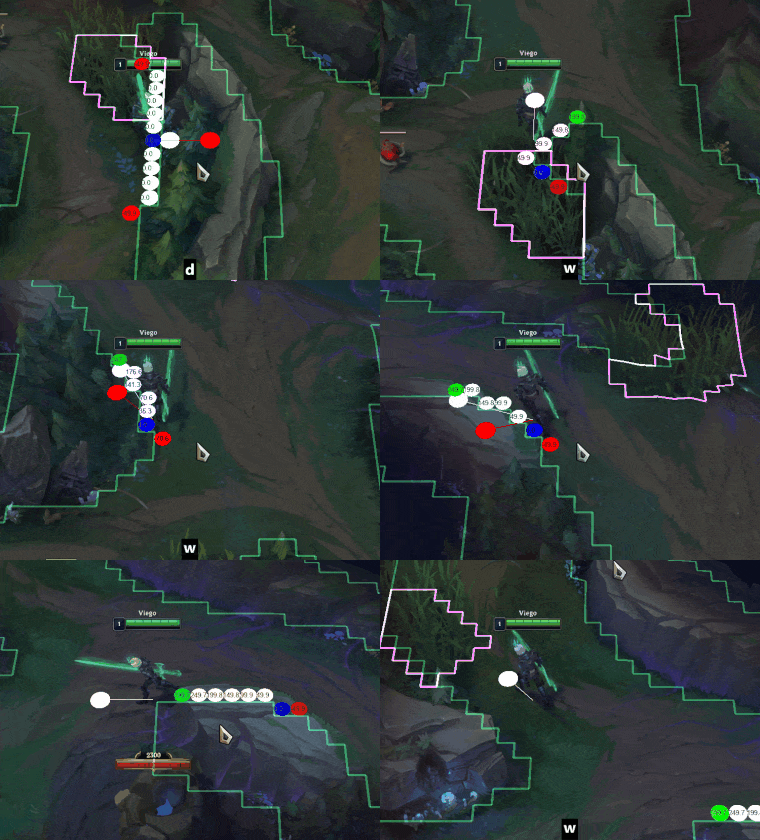
After a lot of jungle playtest feedback, we discovered a critical optimization to make a jungler’s job a bit easier: We completely changed how we handle wall movement interactions when your champion isn’t in the view of your camera.
When your camera is looking at a distant location, WASD pathfinding now always routes your champion around all walls in your way—even those that would normally bring you to a stop. This resolved situations where playtesters thought that they were en route to a critical gank, but instead found themselves stuck inside the blue buff alcove!
Ability Attack Followup Logic
As a convenience, some champions have always automatically started an auto after you use an ability. This is set up for abilities like Tristana’s Explosive Charge or Jayce’s To the Skies, where in most cases you want to follow up with an attack right away.
WASD introduces a unique wrinkle to this setup: While using WASD, attacks can’t be cancelled once they begin. This can lead to WASD users feeling “locked in” to an additional action they didn’t expect.
To improve game feel, the development team tested dozens of champion abilities and turned the specific follow-up attack logic on or off when WASD is in use depending on if it felt right.
Tristana’s Explosive Charge: No.
Garen’s Decisive Strike: Yes!
Champion-specific Keybinds
You’ve been asking for it, and we’re excited to finally share it with you all. Starting tomorrow (Patch 26.8), we’ll be shipping the ability to change keybinds per champion for both Point and Click and WASD.
You can customize more than just ability hotkeys. This includes settings like toggling on and off smart cast (Rumble and Vikor mains rejoice)!
We suggest jumping into the Practice Tool to experiment with customizing your settings so that you have plenty of time to tinker with your options before minions spawn.
New Input System & Accessibility
To bring WASD and champion-specific keybinds to life, we’ve given our input system a complete overhaul. While we were working on all of these features, we also added some new input options to improve the game’s accessibility.
Here are a few options introduced over the past few patches that you may want to explore:
Move the Mouse Cursor with Custom Inputs
This has long been the number one request from the players who use accessibility features. We’ve added new preferences to allow you to directly move the mouse cursor with any input of your choice.
These settings are available for everyone!
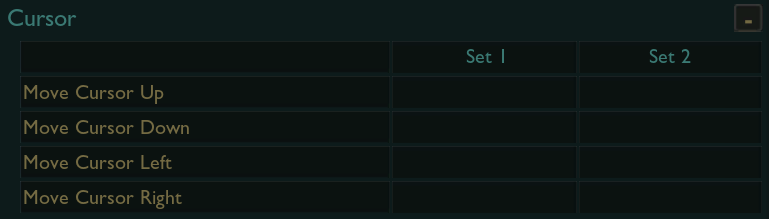
Cursor custom input settings.
Support for Accessibility Controller Joysticks
Something we heard from a lot of folks was the desire to use WASD on a joystick. While we don’t have plans to officially support controllers or joysticks broadly right now, we did want to enable play on joysticks through remapping of WASD for accessibility reasons. So, when it’s live, you’ll be able to use WASD controls on a joystick.
Rotate WASD Input with Map Direction
If you primarily play Summoner’s Rift, you may find yourself holding both W and D (or A and S) a lot as you move up and down the lanes.
If you want to give your fingers a break, try activating “Rotate WASD inputs relative to map lane orientation!”

Rotate WASD inputs relative to map orientation settings.
With this option active, pressing W will move your champion up and to the right and pressing S will move your champion down and to the left.
If you play on a laptop, you may find this setting extra helpful: Some keyboards handle a limited number of simultaneous key presses, so using this option frees up an extra key for performing more actions while moving.
Expanded Keybinding Possibilities
With our input system update, we’ve loosened the restrictions on what keys can be bound to actions.
For example, you may now freely bind MB1 (the left mouse button) to any action directly inside League’s options menu without operating system specific overrides or needing to dig into system configuration files on your own.
In addition, all keyboard keys other than Delete and Escape are now available for keybinding.
Required Keybinds
With great power comes great responsibility. Because keybinding options have been expanded, we’ve added warning labels to the handful of inputs we consider absolutely required.
You won’t be able to leave the options menu until these inputs are set.
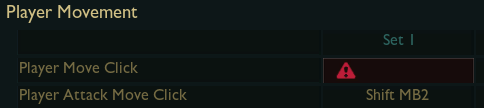
Movement click is required for Point and Click…
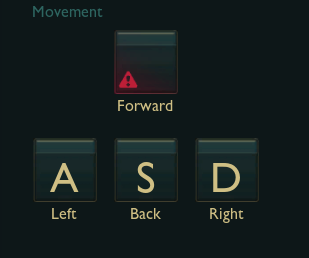
…and movement keys are required to play WASD.
In-Depth Mouse Options
The initial version of WASD combined attacking, selecting, interacting (such as using a Hexgate), and casting ability into one shared keybind, which defaulted to MB1 (the left mouse button).
Based on feedback for more ways to further customize these actions, we’ve split this single setting into discrete options. You’ll find Select Object, Interact with Object, Auto Attack, and Cast Ability in the Casting and Interaction section of the menu.
These options are a little special, and will allow you to assign the same mouse button or keyboard key to as many of them as you prefer. Follow the default behavior and have them all bound to the same mouse button, or go your own way and choose a different input for each one. The choice is yours.
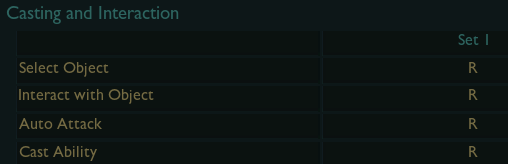
Expanded Casting and Interaction options.
Any Input Issues? Try “Restore to Defaults”
While we did our best over the course of this update to support as many unique setting customizations as possible, there’s a chance that some players may still experience issues as we perform these critical system upgrades.
If you’re having issues with any inputs, we suggest giving “Restore to Defaults” a try to get you back on track as quickly as possible. If you continue to have issues, send a ticket to our Player Support team so that we can assist you directly.
When will you officially support controllers?
We’ve added some support for accessibility oriented controllers, along other new features intended to enhance accessibility. Full controller support is not currently planned, though we are always listening to what players request!
Bug Gallery
Before we finish our discussion of WASD, let’s take a look at some of the most interesting (or strange) bugs the team encountered while bringing a whole new control scheme to League!
The Syndra Wiggle
Bug report: Only while using WASD controls, and only after casting her ultimate at least one time, Syndra often wiggles while walking in a straight line.
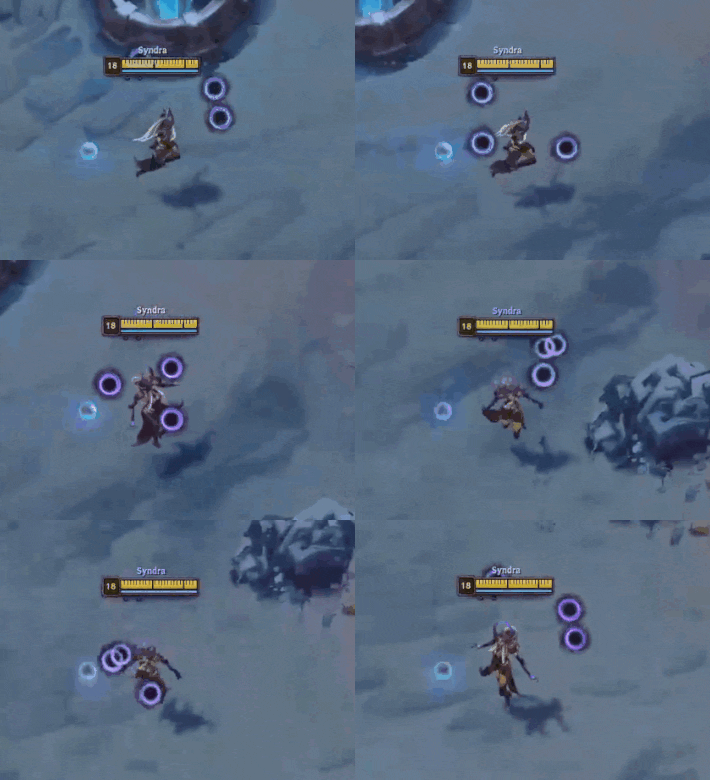
Root cause: In some situations Syndra’s orbs were incorrectly flagged to be able to collide with her. This previously had no impact on gameplay, but the unique pathfinding used by the WASD control scheme revealed the problem by causing her to minutely pathfind around her own rotating orbs.
Aphelios’s Most Unorthodox Auto
Bug report: While using WASD controls, Aphelios can auto attack an enemy within range he has not attacked before exactly one time if Infernum is equipped… while dead.
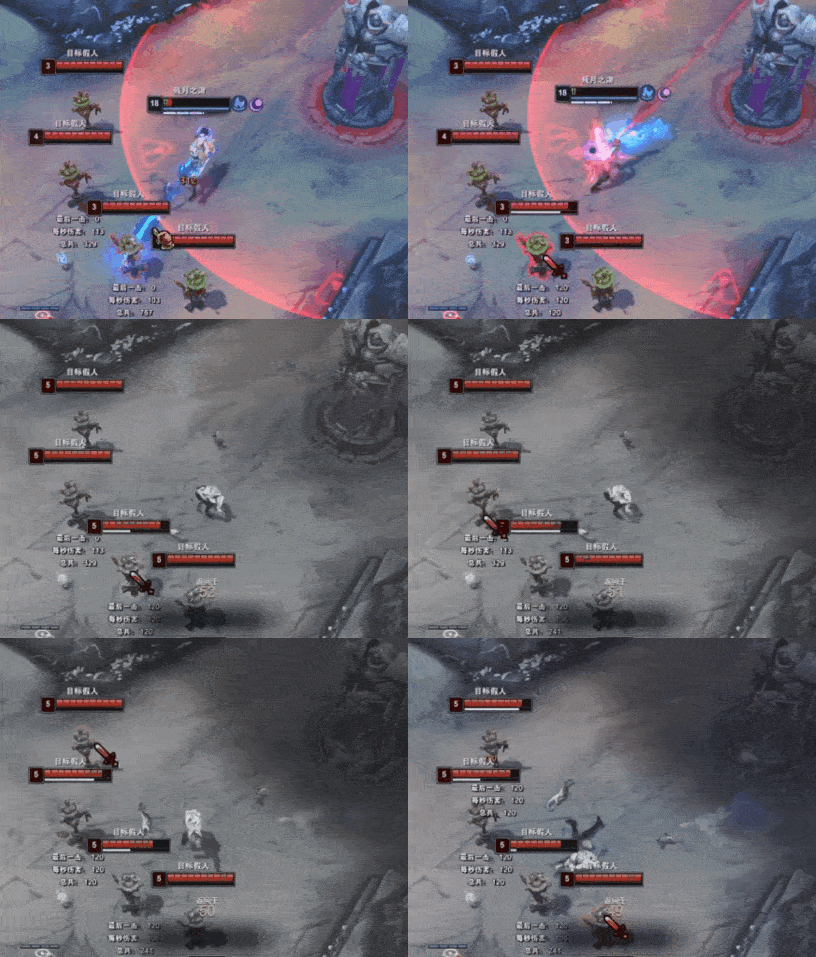
Root cause: A complex ability script combined with the way the WASD control scheme’s kiting logic issues attacks to expose this extremely specific situation.
Super Warwick Drifting
Bug report: While using WASD controls, holding a direction while jumping behind a target using Jaws of the Beast allows Warwick to drift in any direction (rather than only behind his target).
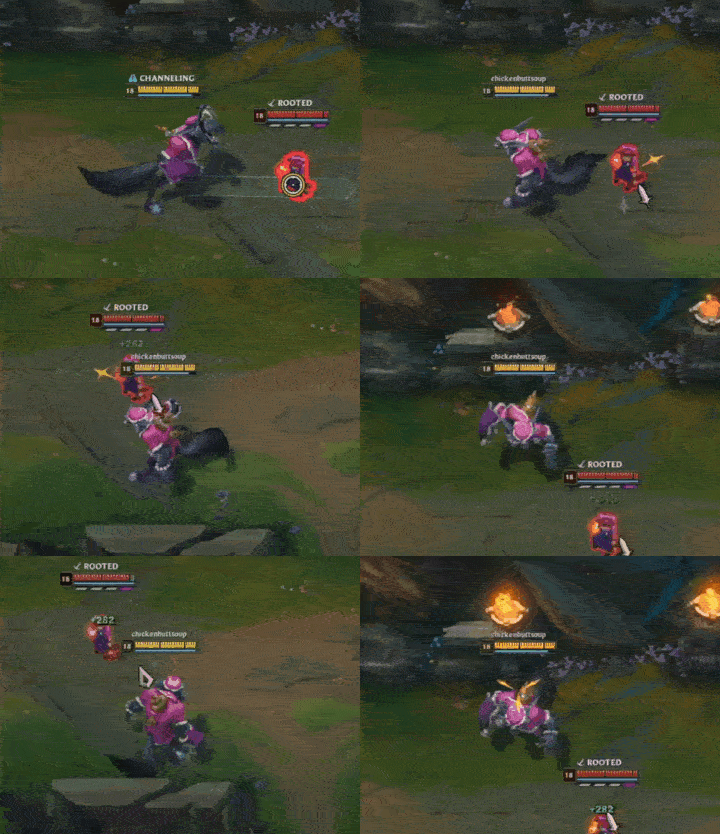
Root cause: All movement inputs are disabled while Warwick is mid-dash, but the WASD input direction was still updating. The calculation of his intended dash destination with the interference of WASD input resulted in some really odd-looking slide animations.
Closing
That’s it from the WASD team for now!
Thank you once again to the hundreds of thousands of players who have been enjoying WASD and sharing feedback.
It’s been a joy to see WASD help players join in on the fun of League, find a more comfortable and accessible way to play, and convince their friends to give our favorite game a try. We'll continue to tune and maintain it so it stays a viable way to play for years to come.
See you on the Rift!