
Season Start: For Demacia! Emote Twitch Drops
To kick off the new ranked season, and to celebrate all things Demacia!, we’re teaming up with our League Partner Program (LPP) creators for a special, two-week Twitch Drops event! This is our way of supporting the incredible players, educators, entertainers, and theorycrafters who make up the LPP community, while giving everyone at home a pair of exclusive, in-game emotes to unlock.
Whether you’re rallying behind your favorite champion mains, watching ranked climb streams, or celebrating the season reset with your crew, here’s everything you need to know.
When are the Season Start Emote Drops?
From January 9 at 00:00 UTC until January 25 at 00:00 UTC, you can earn two limited-time emotes by watching or supporting participating LPP creators on Twitch.
Rewards & How to Earn Them
“Lightshield Stonks” Emote
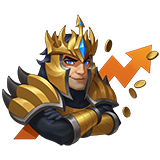
How to unlock:
Watch one hour of any eligible LPP streamer’s livestream during the campaign window.
(Please note: VOD viewing does not count toward earning this reward.)
“GarenHype” Emote
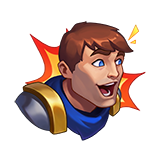
How to unlock:
Newly subscribe or gift a subscription to any eligible LPP streamer during the campaign window.
(This only includes first-time subs or gifted subs. Re-subscribing does not count towards emote drop rewards.)
Which Channels Are Eligible?
These emotes can only be earned by watching or supporting official League Partner Program channels.
Here’s how to find an eligible channel:
- Log into Twitch.
- Choose an active Drops campaign from the All Campaigns page under Drops & Rewards.
- Find active participating channels listed at the top of How to Earn Drops.
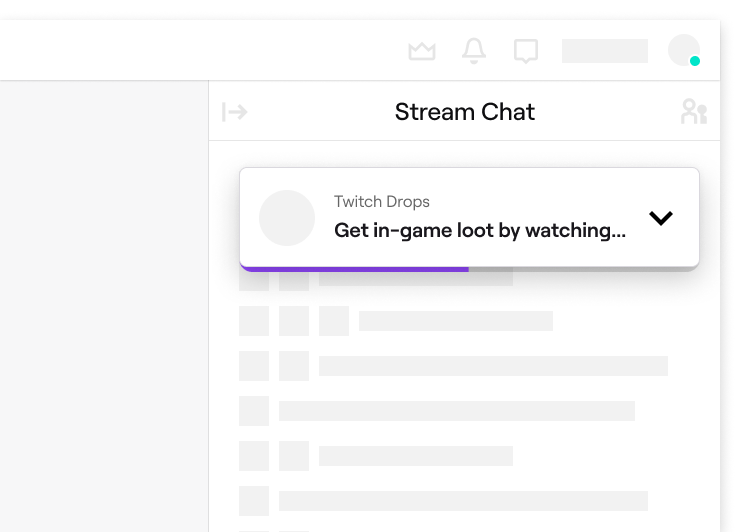
- Navigate to a channel with Drops enabled. A Drops callout will be displayed at the top of the chat that includes information about the Drops campaign.
- Complete the Drop requirement, such as accruing watch time or purchasing (a) new subscription(s).
Participating streamers will have a Twitch chat graphic once you click on their stream that identifies them as eligible for Season Start Drops. If you see the below graphic, you’re in the right place.
Redemption & Delivery
Please ensure your Riot account is linked to your Twitch account in order to receive your emote! If you’re unsure how to do this, please see our FAQ at the bottom.
Remember, you can only earn progress towards a Drop on one participating channel at a time. You can check your progress towards Drops any time by viewing the Drops Inventory page.
When you have reached 100% progress for the active Drop within a campaign, you will receive a claim notification at the top of the Twitch navigation. If you are unable to claim the Drop in time, you will be able to claim it from the Drops Inventory page until 7 days (168 hours) after the Drops campaign has ended.
NOTE: Subscriptions can be purchased on either mobile or web. Only subscriptions purchased when a channel is live in the correct category, during an active Drops campaign will earn Drops.
Drops Troubleshooting
Having trouble earning Drops? Try these quick troubleshooting tips:
- Browser extensions that block advertisements may prevent Drops progress watch time from accruing. Disable these browser extensions, and see if your watch time continues to progress.
- Remember, you can only participate in one Drops campaign at a time! In other words, you cannot accrue watch time towards multiple Drops at the same time.
- If you've completed a drop's requirement, but are having issues claiming the drop, double check which game account you have connected to your Twitch account. You may need to contact the game developer or publisher directly for further assistance. Learn more.
Looking Ahead
We’re continuing to explore new ways to support LPP creators and bring players closer to the community that shapes League every day. This is just our first stab at this, and we’re already planning additional Drops for the future, so please look out for more later this year.
As always, we welcome your feedback as we continue improving how we collaborate with creators and reward players for tuning in, so please let us know your thoughts!
FAQ
How do I link my Riot account to my Twitch account?
- Log in on twitch.tv
- Go to Settings → Connections
- Scroll to Riot Games
- Click Connect
- Sign in to your Riot Account and authorize the link
Is the reward region-locked?
The Drops are not region-locked, but they are only available on Twitch and in regions where Twitch Drops are supported.
Does watching a VOD count?
No. Only live viewing counts toward the one-hour watch requirement and only subscribing or gifting a sub while the channel is live counts toward the subscription requirement.
Can I split the hour across multiple streamers?
You must reach one full hour in totality in a single channel for the “Lightshield Stonks” emote. With that in mind, please check out all of our amazing LPP creators anyway!
Is there a limit?
Yes, one of each emote per Riot Account linked to your Twitch account.
What are the campaign dates and times?
The full campaign runs January 9, 00:00 UTC to January 25, 00:00 UTC.